Creating a 10MB video file
2-ish years ago, Discord reduced their file size limit from 25MB to 10MB. Kinda tight. Pain in the ass for sharing terrible fighting game clips to my friends. But probably no big deal.
How hard could it be to compress a video to 10MB?
prior work 🔗
Ground floor: 8mb.video, a web service I see people using occasionally.1
Throwing Ring Racers footage into a video encoder is a bit like throwing a cinderblock into a running dryer, but let’s give it a try:
This looks like ass, but that’s normal—this is a free web service, probably trying to keep hardware utilization to a minimum, being asked to compress 2 minutes of repeating high-contrast 3D patterns into a postage stamp. It’s probably a technological miracle it doesn’t look worse.
However, this video is 6.6MB, even though our target size was 8MB. Why? Shouldn’t the encoder have used the other 1.4MB, especially if the result is so obviously in need of help?
Whatever, weird web service. Let’s try VidCoder—open source, uses Handbrake for encoding (everyone seems to swear by this one), explicitly provides a “target size” setting when you’re making an encoding preset. We’ll use a more modern codec (AV1 instead of H2642) and let it churn for a while.
That definitely looks a lot better. However, it’s 14.6 MB out of a requested 10MB, so it’s useless as a Discord upload. Is this just…not something that software supports? Surely there’s some combination of FFmpeg options that can get us there?
not really 🔗
The usual solution you see shared online, and the one in FFmpeg’s docs, is to divide target size by duration to get a target bitrate, then have FFmpeg encode with that bitrate as an average.
This seems reasonable on paper, but it’s sort of annoying. Your audio comes out of the same budget, which means that your actual practical overhead differs based on whether you’re reencoding it or not (and at what bitrate), and then you have to leave a little room for miscellaneous overhead,3 and by the way you have to multiply by 8388.608 to get from mebibytes to kilobits what the fuck ever…
(If I need my computer to do a task and I’m the one doing math for it, I feel intuitively like something’s gone wrong.)
It also still isn’t guaranteed to work, at least for this case. I gave it a try myself; I disabled audio to make the math easy, rounded the video duration up and the bitrate down, and still went over budget by 300KB. Given the same target bitrate, HandBrake (at 720p30 AV1) came in at 8.5MB, whereas boram’s VP8 settings produced a 22MB 720p60 encode, not even close.
This is for a bunch of overlapping technical reasons, like “container overhead” and “codec internals” and “average bitrate is not a mathematical average”…
…mostly, it seems like encoders are just not really designed to do this? Like, it’s not naturally well-suited to how modern video codecs work, and it’s not something that most people care about; many encoders are designed to break bitrate suggestions if it’ll preserve visual quality.4
In practice, every one-stop solution involves trading overshoots for undershoots; nobody seems to care much about doing this. But if you have to use automation to calculate the bitrate anyway, then…maybe an iterative approach could work? What if the answer is just trial-and-error with multiple full encodes until something uses more or less the right amount of data? What if we just guess-and-check the whole process?
What if I did something so stupidly inefficient that no one had bothered to try it yet?
interlude: what works good enough? 🔗
You are about to enter the part of this article where I talk about vibecoding a personal solution to this problem for fun. This is your bail point, and I’ll leave you with some concrete software recommendations before I introduce my Horrible Fucking Thing that you probably shouldn’t use.
Shutter Encoder: Glossy FFmpeg frontend mostly concerned with high-quality outputs at slow encoding speeds. Combines a lot of common functions into one tool and labels them pretty well.
LosslessCut: Best-in-class for cropping clips out of videos while preserving their original quality and file size. This doesn’t compress video, but if the file is already small enough, this will keep it small instead of ballooning the file size with a wasteful reencode. I’ve used this basically every year while preparing the Advent Calendar writeups.
Avidemux: Alternative to LosslessCut that does more things more confusingly. This one can reencode, apply filters and basic effects, and supports a ton of output formats, but if you reach a bad state where it can’t do what you ask, it will tell you to fuck off with no additional information. Still a nice tool to have.
boram: Abandoned and slow, but served me well for many years as a general-purpose video toolbox, and actually displays its FFmpeg args—making this a pretty good “living reference”. I haven’t seen any program in this space get so close to its goal; I’d be hacking on this instead of fucking around with Codex if compiling it didn’t look like such a pain in the ass. Includes hardsubbing support for anime shitposters.
FFmpeg: No, really! It’s a command line tool, sure, it’s a little scary, but the basic form is
ffmpeg -i myinputfile.avi myoutputfile.mp4, and this works for just about every single media format under the sun—saves tons of time and effort compared to operating bespoke converter software that is just an FFmpeg frontend anyway.The documentation is mostly human-readable, and StackOverflow has you covered with decades of mediocre advice if it isn’t. If you’re on Windows and you don’t work with command-line tools often, look up how to add this to your PATH so you can invoke it from anywhere. You can type “cmd” in the address bar of any folder and hit Enter, and it’ll pop open a terminal pre-opened to that folder. Use Tab to complete filenames. You can do it, I promise!
Golden rule: If you’re using off-the-shelf software and want it to correctly enforce a filesize limit, downscale your output to a reasonable size for the target bitrate. If you only have 600kbps of headroom for video, but you tell your encoder to output a 1440p video, it will tell you to kick rocks and bullshit the bitrate.
enter the lying machine 🔗
My previous solution to this problem was, like, six or seven batch scripts, and writing batch makes me feel like I should be in third grade every time I see a quotation mark.
Maybe I should do literally anything else?
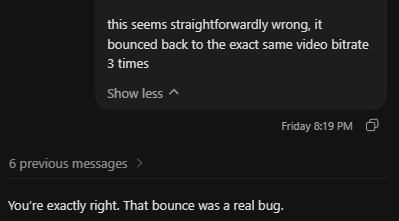
LLMs are somewhat reliably terrible at almost everything, so I almost never use them, but there’s a narrow window of software development where I think they can save a lot of time; when project requirements are narrow and completely set in stone, when you know the exact steps of a procedure but not how to express it with the language or API you’re using, and when failure is easily verifiable and has zero consequences.5
That’s only one dimension of the forever war around LLMs, but “stupid dipshit tool script for encoding fighting game clips” seems like a pretty low-stakes playground for this kind of thing—could make for a fun afternoon, especially if I can freeload off a housemate’s Codex subscription and learn about The Future Of Programming™6 in the meantime.
Introducing DipshitCut.
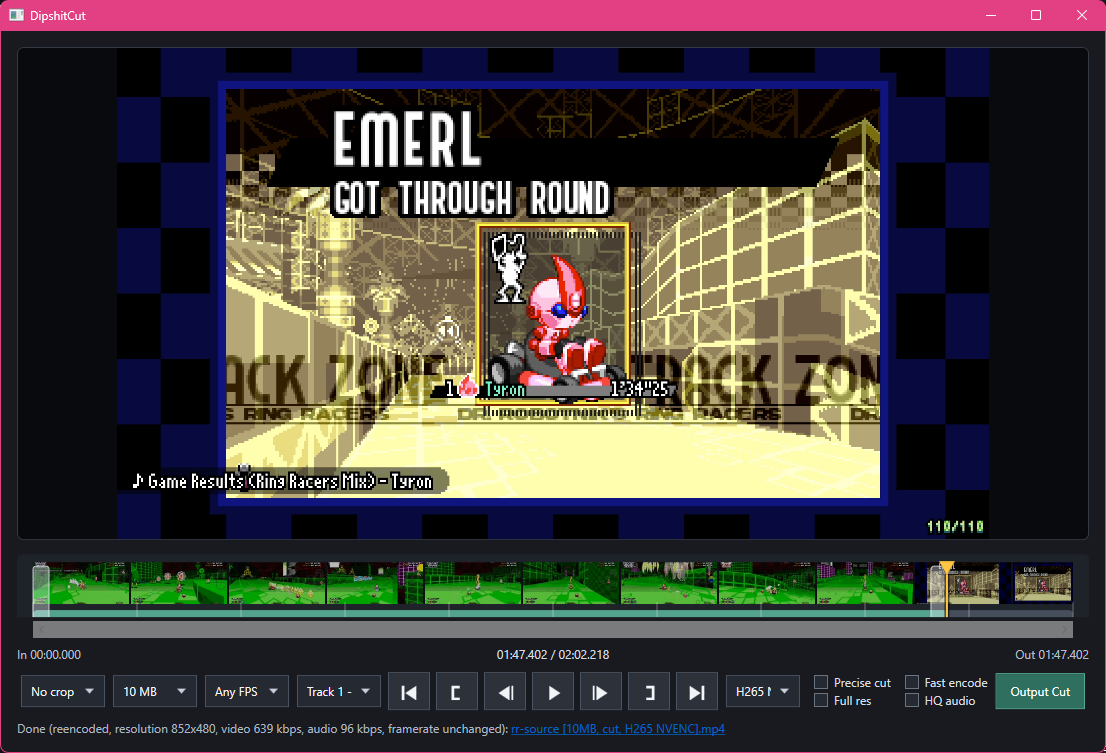
DipshitCut’s procedure is pretty simple; pick a target bitrate (mildly undershooting on purpose), pick a reasonable maximum resolution and FPS for that bitrate, try an encode, and try again if the size overshoots or significantly undershoots. Codex configured this to loop a maximum number of eight times—I’m pretty sure I said “lol” out loud, then didn’t change it—but in practice it usually only takes one, and rarely takes more than three, since it can kinda binary-search after the first two attempts.
I think that “pick your constraints” step is the one missing from most tools, and for good reason; most tools are concerned with maximizing output quality given a user-selected set of constraints,7 but basically everything about the design of DipshitCut is intended to make a good enough video relatively quickly, so it makes somewhat-sane constraints up. This approach produces generally worse results on low-motion video, this is definitely not the type of thing you should be using for screencasts, and if you’re sharing a music video, you’re probably unhappy with getting downgraded to 64kbps mono audio.8
I wanted to see how far this could go, so it’s also got a codec selector (including one-pass encodes for NVENC stuff), the ability to switch or disable audio tracks, aspect-ratio cropping for my wackass ultrawide recordings, and the ability to crop to a start and end time, copying the video instead of reencoding if it can. (Theory borrowed from LosslessCut, which is excellent software.)
I feel obligated to point out that, like, this kinda works. DipshitCut, a project name that accurately reflects my investment in the project, will probably help me post terrible videos in the future. It has all of the features I could think of at the time, set up to work exactly for my workflow and no one else’s, and for the most part I goofed off and made music and talked to my friends while it was being made.
I also definitely felt like Indiana Jones outrunning the technical debt boulder the entire time.
Working with Codex is like directing a two-headed junior dev; every Slack message has an 80% chance to be answered by the right head, who always tells the truth and never lies, and a 20% chance to be answered by the left head, who types exactly like the other guy but is so dumb and confused that it can’t even lie correctly. The left head misdiagnoses bugs, removes working features in order to get credit for fixing their bugs, makes batshit structural changes that you have to go back and rip up later, and is generally committed to misunderstanding everything in the most destructive way possible. If the right head fixes a bug, the left head doesn’t know, and will happily reintroduce that bug because the code Seems Cleaner This Way.
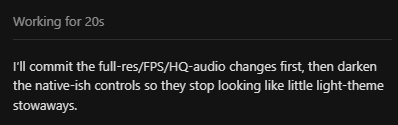
Neither head ever remembers to give itself log output, instead writing weird inline PowerShell scripts to recreate events, or inventing a dogshit unattended test mode that failed to catch even 100% repro-rate crashes. Every bugfix got faster and smoother when I reminded it “add more logging around this problem area, then read the logfile”. It would then immediately forget that it could do this, and I would have to remind it again—fix root causes instead of removing features. Check your inputs and control flow instead of assuming you know what’s running and when. Look at the fucking output instead of guessing.
Codex is lazy. As a result of that (and my “okay let’s see what you’ve got hotshot” style of oversight—I gave it zero help), this tool is probably kind of ass, and I expect to incrementally hack on it when I discover new and unknown ways that it’s ass. It’s definitely not cross-platform without some work, encoding speed-versus-quality tradeoffs are randomly selected based on how irritated I was with waiting for test encodes, Codex decided whether to copy code or create bad abstractions by flipping a coin, I blindly pulled in LibVLCSharp for the preview pane and its playback isn’t perfect,9 there’s zero error handling, the “precise cut”10 checkbox has created internal behavior branches that look like some shit from Stranger Things, it makes arbitrary choices like switching to mono audio under bitrate pressure (based entirely on my vibes), and Codex randomly put in Intel/AMD hardware-encoding stuff that I cannot possibly test.
Like, it’s a 200MB single-package executable because I want it to live in my Videos folder and take up as little space in the file list as possible, and apparently that self-extracting process is slow enough that sometimes it takes five seconds to show up. (hey maybe we shouldn’t bundle all of .NET and an entire video player) I didn’t bundle FFmpeg because it was already in my PATH. Whatever. Maybe a later problem, maybe a never problem.
I don’t really like programming. I like designing procedures and debugging logic and identifying Things That Need Doing, and I accept (begrudgingly) that programming—continually getting slapped in the dick by other peoples’ software design, needing to format exacting instructions for a machine even more inflexible and literal than I am, needing to place those instructions in the exact right place and perform the arcane rituals of The Build System so that all the Supporting Software lets me interact with the fun parts—is the cost of doing this.
In that way, it seems like I’m the target audience for LLM software tooling, and I have to admit, it sure did…uh, produce an output. I learned a handful of incidental things while “working on” it, useful observations about video codecs and the software responsible for working with them, and I ended up with a tool that I’ll probably use in the future; I’m mostly glad to have done this, and I like the idea that what I’ve learned might help people navigate similar problems.
But I think I might like programming more than I expected. The result of this strange, feverish process doesn’t really feel like My Software, and I didn’t really get any of the feel-good neurotransmitters that I associate with building useful things. Even after spending an afternoon and change on it, it still feels like something that teleported half-formed into my Videos folder and lives there as a brutalist solution to a problem; I think I skipped a lot of decisions in the process of “making” it. It makes me feel a little strange.
Also, when I encode a long test file with NVENC H264 targeting 10MB, it does this:
attempt 1: 860x360, 523k video, audio 64 kbps mono, source fps, 10.23 MB (102.3% of target)
attempt 2: 860x360, 502k video, audio 64 kbps mono, source fps, 9.05 MB (90.5% of target)
attempt 3: 860x360, 517k video, audio 64 kbps mono, source fps, 9.04 MB (90.4% of target)
attempt 4: 860x360, 521k video, audio 64 kbps mono, source fps, 9.04 MB (90.4% of target)
attempt 5: 860x360, 522k video, audio 64 kbps mono, source fps, 10.23 MB (102.3% of target)
attempt 6: 860x360, 521k video, audio 64 kbps mono, source fps, 9.04 MB (90.4% of target)
Huh? Why does changing the target bitrate from 522,000 to 521,000 shave 10% off the file size? Why does this only happen with NVENC H264? What is the codec quantizing and why?
takeaways 🔗
(This is the way I end articles when I have no fucking ending.)
Most video encoders prefer to target a consistent level of visual quality, rather than a highly precise output size. The closest you’ll usually get is a way of specifying “maximum size” along with their usual smart-bitrate adjustments, which often leaves available data on the table.
A codec’s relationship between “requested bitrate” and “actual output size” depends on that codec’s quirks, the source video’s level of motion and detail, and the targeted resolution/FPS: encoding bigger and smoother videos will often “break the average” more readily.
- Corollary: If you’re using off-the-shelf “regular software” and want to make sure that your video comes in under a target size on the first try, your best hope is to pick a reasonable output height for the bitrate and cross your fingers.
Online “file converter” services are almost always the worst tool for the job, unless your only metric is “what is the minimum effort I can personally apply in the moment”.
Did you know that AV1 can save on data and visual quality by denoising grainy video and simulating fake film grain on top? What the fuck? If this is the kind of thing we’re doing with video, this is definitely above my pay grade.
LLMs are chronically wrong, but can save you some time and generate nominally useful outputs if your project requirements are narrow, known completely, and totally immutable…and if the appearance of The Left Head That Always Hallucinates isn’t going to ruin your day.
Solving puzzles can be satisfying even if the puzzle itself is arbitrary poorly designed horseshit.
I made something that is bad and dumb (but kinda useful in specific circumstances) with a tool that is bad and dumb (but kinda useful in specific circumstances).
This probably means nothing.
don’t download 🔗
DipshitCut is vibecoded ass that could delete your computer. Actually, it could do literally anything. You probably shouldn’t use it, and I’m only providing it because it would feel a bit like dangling chocolate in front of my readers to say “btw I have a tool that solves a problem you might have” and then refuse to give it up.
YOU ACCEPT EVERYTHING THAT WILL HAPPEN FROM NOW ON.
Download DipshitCut + source. This has no release tags or structure, and will update unexpectedly when I do some shit that seems like it might be useful to anyone else dumb enough to use this.
DipshitCut needs .NET installed, and ffprobe.exe, ffmpeg.exe, and mpv.exe next to the executable or in your PATH.
- .NET: https://dotnet.microsoft.com/en-us/download
- ffmpeg / ffprobe: https://www.gyan.dev/ffmpeg/builds/ (I use ffmpeg-git-full)
- mpv: https://sourceforge.net/projects/mpv-player-windows/files/ (or your choice on https://mpv.io/installation/)
Misc notes:
- Right-clicking “Output Cut” will produce a log next to the output video, which shows the ffmpeg parameters and any size-fit attempts.
- Right-clicking “go to start” will play your selected clip end-to-end and stop.
- Codec selection doesn’t do anything if you don’t select an operation that requires a reencode. Cropping, size limit, or “precise cut” mode will do this.
- You can watermark your video for no reason by right-clicking the “frame advance” button.
Watermark font is “Pixuf” by Erytau, licensed CC0.
(I also made a simpler prototype of DipshitCut that doesn’t have a GUI and most of the options, but is more likely to build or run on other platforms—drag and drop for a 10MB export.)
8MB was the “old” limit, before it was raised to 25MB and then dropped back down to 10MB. ↩︎
I’m not a visuals guy, so it sort of surprised me that modern codecs really are noticeably better than H264. I’ll still probably end up using H264 for Advent Calendar writeups (compatibility reasons), but…now it’ll make me slightly sadder? ↩︎
Ring Racers has an in-game video recorder that actually tries to cover for some of this; if you set a limit of 10MB, it stops at 9.8 or 9.9 to allow the encoder to finish up without going over the line. But it does that by stopping the recording. ↩︎
Boram’s VP8 parameters shit the bed at 720p, but came in at a comfy 9.8MB in 240p—because the encoder saw “240p” and went “okay, less detail seems fine”. Also, Boram is cool software and I wish it was maintained, its AV1 support uses libaom and takes approximately the age of the universe to encode one frame. ↩︎
That last condition feels like the important one for all LLM use, honestly. Fundamentally, these are probabilistic pattern noticers. ↩︎
To be clear, I don’t actually think LLMs are the future. I’m not really convinced they’re the present, either; they’re a tool that can observably save a lot of time in specific circumstances, but I think we’re all going to have a really Exciting™ couple of years once they stop getting propped up by infinite-growth freakazoid VC hype and get priced in correctly.
I am also not a superforecaster, economist, or AI expert. I am Some Guy. Please don’t mindlessly import my opinions, I put my pants on backwards sometimes. ↩︎
Boram actually uses the slowest possible mode for every codec it supports, which produces nice-looking files but is definitely not compatible with a try-multiple-times approach. A VP9 encode of that test file processed at 0.1x speed. ↩︎
During the writing of this article, I patched overrides for some of these behaviors in, but they’re still worse than a well-thought-through process for that specific purpose. ↩︎
I wanted to just use default Windows stuff, but Windows doesn’t speak WebM. I think most projects end up using mpv in some way for this. ↩︎
Without reencoding the head and tail of a video clip, FFmpeg has to crop at keyframes, which means that the duration of your clip might be different from the selected in/out points. ↩︎